Procurement Management ERP: Streamline Purchasing, Manage Suppliers & Reduce Costs
procurement management system (ERP)
Procurement Management System: Automate Purchasing & Reduce Costs with ERP
A procurement management system helps businesses automate purchasing, manage suppliers, track purchase orders, and connect procurement with inventory and accounting. Instead of relying on spreadsheets and manual approvals, companies can use ERP procurement software to reduce errors, control costs, and improve purchasing visibility.
In this guide, you'll learn:
- What is a procurement management system?
- The procurement cycle in practice
- Benefits of procurement automation
- The seven stages of the procurement cycle
- Supplier management
- How ERP reduces purchasing costs
- Procurement analytics
- ERP vs. Excel and traditional methods
- Why choose MaxFlow for procurement
- FAQs
What Is a Procurement Management System?
A procurement management system is one of the modules of an Enterprise Resource Planning (ERP) systemLearn more. It's built for procurement managers and operations managers. It replaces email threads and scattered Excel sheets with one digital workflow for every purchasing step. Modern procurement management software helps companies reduce manual work, improve supplier visibility, and control purchasing costs.
You may also know it as procurement software or purchase requisition software. Either way, it's the same idea: a digital system that replaces email threads and scattered Excel sheets with one workflow for every purchasing step, from the first request to the final payment.
A quick example
A retail company receives 200 purchase requests a month. Without automation, each one needs manual approval - that can take days. With a procurement ERP, the same request moves from submission to approval in minutes, with a full record of who approved what and when.
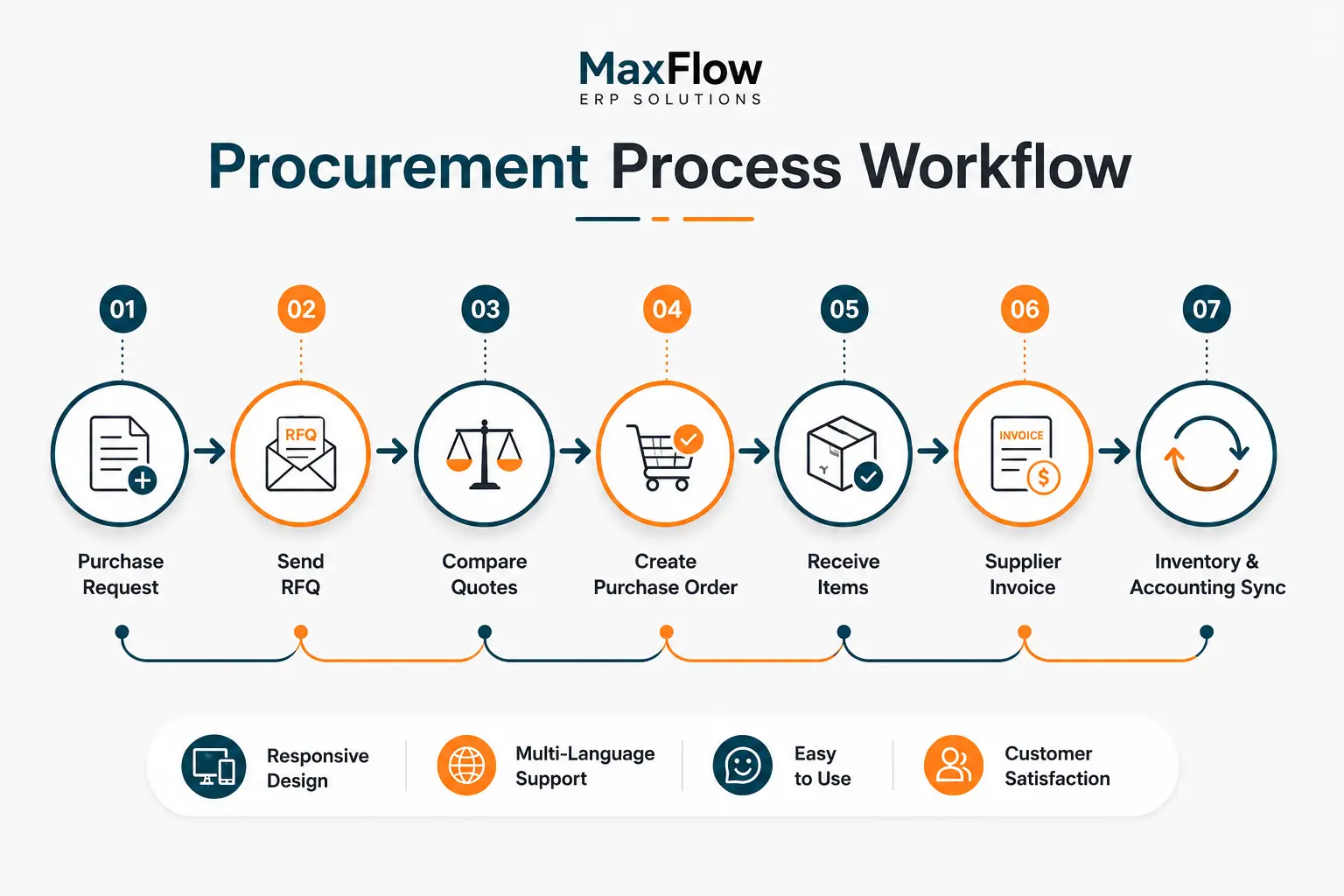
Understanding the definition is only the first step. The real value of a procurement ERP shows up once you see how every purchasing stage connects together - that's what the workflow below illustrates.
The Procurement Cycle in Practice: One Connected Flow From Request to Payment
With an integrated procurement ERP platform, your business can:
- Create and manage purchase requests electronically
- Send requests for quotation (RFQs) to multiple suppliers at once
- Compare supplier quotes automatically
- Issue purchase orders in a single click
- Track item receipt and update inventory instantly
- Manage supplier invoices and payments
- Automatically connect procurement to inventory, warehouses, and accountingLearn more - with no duplicate manual entry
A Simple Walkthrough of the Procurement Cycle
Watch this short explainer on how a procurement ERP cycle works, from the initial purchase request all the way to receiving goods and managing suppliers:
 ▶ Procurement cycle overview - watch on YouTube
Why Does Your Business Need Procurement Software?
Every purchase affects your inventory, cost, and cash flow. That's why procurement management software matters. It helps procurement managers and CFOs monitor spend and analyze supplier performance. Decisions get made on real data - not guesswork or someone's memory.
Key benefits companies see when they digitize purchasing:
- Fewer errors caused by manual processes
- Procurement cycles that shrink from days to hours
- Better supplier management and negotiation
- Optimized purchasing spend through easy quote comparison
- Stronger transparency and internal approvals
- Better inventory control, avoiding stockouts or overstocking
- Real-time reports and analytics to support strategic decisions
Connecting procurement to a point-of-sale (POS) systemLearn more also gives you full visibility from the moment an item is purchased to the moment it's sold, helping you plan reorders based on actual sales activity.
Want to see how MaxFlow can organize your company's procurement cycle?
Request a free demo and see the system in action before you decide.
See How MaxFlow Handles Your Purchasing WorkflowThe Complete Procurement Cycle in an ERP System
The procurement cycle runs through seven connected stages inside the system, designed to make sure every purchase is executed efficiently and transparently:
Create a Purchase RequestPurchase Request
The process starts when a department needs materials or services. An employee creates a purchase request in the system and sends it for approval from any device.
Approve the Request
Managers review the request and confirm the budget and actual need before approving it, with a full record of every approval or rejection.
Send a Request for QuotationRFQ
Once approved, the system sends a request for quotation to one or several suppliers at the same time to source the best offer.
Compare Supplier Quotes
The system gathers all quotes on a single screen for quick comparison, so you can pick the best supplier in minutes.
Issue a Purchase OrderPurchase Order
The system generates automated purchase orders with all agreed details and sends them directly to the supplier.
Receive the Items
When goods arrive, the employee records the receipt in the system, and inventory updates automatically and instantly.
Match Invoices and Payments
The system automatically matches the purchase order against the received goods and the supplier's invoice before approving payment, reducing financial errors and ensuring accuracy at every step.
What Is Three-Way Matching in Procurement?
Three-way matching is the control step behind that last stage. Before any payment goes out, the system checks that three documents agree with each other: the purchase order, the goods receipt, and the supplier's invoice. If the quantities or prices don't line up, the payment gets flagged instead of processed automatically. It's a standard accounting safeguard, and it's one of the clearest ways procurement workflow automation catches errors that manual reviews tend to miss.
Managing Suppliers More Effectively
A procurement platform isn't only about executing purchases - it's also a form of supplier relationship management that helps you build strong, lasting supplier relationships. With an integrated ERP, you can:
- Build a central database for all suppliers
- Categorize suppliers by type or importance
- Evaluate each supplier's performance objectively
- Track delivery-time compliance
- Compare prices continuously over time
- Keep a full record of every past transaction
All of this helps you choose the most efficient suppliers and strengthen your negotiating position on every future deal.
How Purchasing Automation Helps Reduce Costs
Purchasing automation helps eliminate unnecessary purchasing expenses - something that matters especially to factory owners and operations managers looking to control costs without sacrificing supply speed - through:
- Automating routine processes and cutting paperwork
- Preventing accidental duplicate purchase orders
- Avoiding stockouts or excess purchasing
- Better planning of future orders based on accurate historical data
- Securing the best available quotes from suppliers
Procurement Analytics That Help You Make Better Decisions
Modern purchasing automation solutions double as spend management software, offering a wide range of ready-made reports that help you monitor performance in real time, including:
- Spend analysis by department or supplier
- Purchase order reports and status tracking
- Supplier performance and compliance
- Purchasing trends over time
- Price comparisons across suppliers
This data helps you make decisions based on real numbers instead of guesswork - exactly what sets confidently growing companies apart.
Procurement ERP vs. Traditional Purchasing Methods
Many companies still manage purchasing the traditional way, but the difference between that and an integrated ERP system is clear and fundamental:
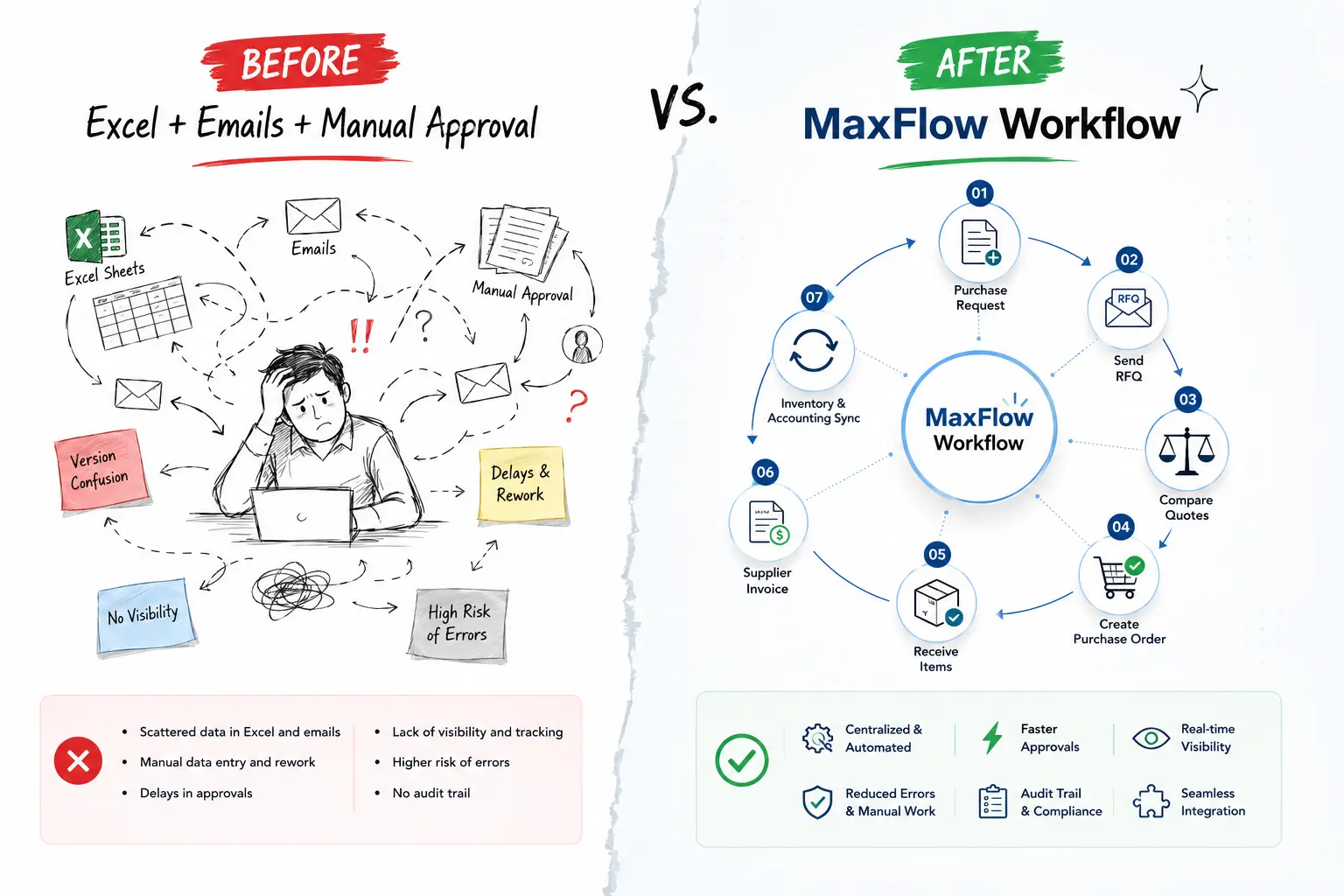
This exact difference is why more companies are moving toward ERP solutions instead of sticking with scattered traditional tools.
Is your company's purchasing still running on Excel and manual processes?
Turn your procurement cycle into a fully digital process with MaxFlow and get complete visibility into every purchase order and supplier.
Request a Custom QuoteOnce you understand why purchasing automation matters, the real question becomes: which system is right for your business?
Why Choose MaxFlow for Procurement Management?
MaxFlowLearn more ERP provides an integrated ERP procurement module that connects every department across your organization, ensuring purchasing runs efficiently and quickly without needing multiple disconnected tools.
It's a strong fit for owners of small and mid-sized businesses looking for a flexible ERP that combines ease of use with fully integrated operations, without the complexity and high cost that can come with some global ERP solutions. MaxFlow stands out as:
- Fully cloud-based: no servers or internal IT maintenance required
- Built for regional businesses: designed to fit how companies in the region actually work
- Right-sized for SMBs: without the complexity of enterprise-scale global systems
- Everything works together: one login, one source of truth across departments
If you'd like to compare available financial solutions in more depth, read our guide to the best accounting softwareLearn more.
MaxFlow helps you:
- Run 3-way matching: between the purchase order, goods receipt, and supplier invoice before approving any payment, preventing errors and fraud
- Fully automate the procurement cycle from request to payment, with automatic reorder requests when stock drops below the minimum threshold
- Manage purchase requests, quotes, and suppliers from a single place
- Customize approval workflows to match your company's structure and user permissions
- Access procurement data from anywhere through the cloud-based system
- Get real-time reports and analytics that support decision-making
Thanks to this integration, your business can improve purchasing efficiency, boost productivity, and increase transparency across every purchasing process with MaxFlow - from day one.
Frequently Asked Questions About Procurement Management Systems
Yes. Procurement ERP is not limited to large enterprises. Small and mid-sized businesses can use flexible systems like MaxFlowLearn more to organize purchase requests, track suppliers, and reduce reliance on manual processes, without high costs or added complexity.
It depends on your company's size and process complexity, but with a flexible cloud ERP like MaxFlow, you can go live with the core procurement modules in just a few weeks.
Yes. When goods are received or an invoice is posted, MaxFlow updates your stock levels and financial ledger automatically in the background. Nobody has to key the same numbers into two separate systems.
Not necessarily - systems like MaxFlow offer flexible plans that fit any company size, which often makes the upfront cost lower than the long-term losses from manual errors and duplicate purchase orders. Since pricing depends on your team size and which modules you need, request a custom quoteLearn more for exact numbers.
Replace scattered spreadsheets and email threads with one system every department can see into - the person requesting supplies, the approver, and the finance team closing the books. That shared visibility is what actually cuts down on errors, not the software alone.
"Purchasing software" often refers to a standalone tool that only handles purchase orders. Procurement ERP, like MaxFlow, goes further - it connects those same purchase orders directly to inventory, accounting, and supplier records, so nothing needs to be re-entered manually. That connection is also what lets it fully replace spreadsheet-based purchasing as your order volume grows.
Turn Procurement Into a Smart, Connected Process
Organize purchasing, supplier management, and inventory on one platform with MaxFlow ERP.
Book Your Free Procurement ERP Demo
لا تعليقات حتى الآن. بدء مناقشة جديدة.